Book writing software for writing a novel in Urdu
Urdu is where most software quietly gets it wrong, by handing you an Arabic Naskh face and moving on. Galley sets Urdu in Nastaliq, shapes it properly in the print PDF, and says plainly that the face Urdu publishing actually runs on is not free to embed.
اردو میں ناول کیسے لکھیں
گیلی وہ جگہ ہے جہاں آپ ناول لکھتے ہیں اور اسی سے کتاب بناتے ہیں۔ آپ پہلے جملے سے ہی ایک اصلی کتابی صفحے پر لکھتے ہیں: آپ کا سائز، آپ کے حاشیے، اور وہی خط جس میں کتاب چھپے گی۔
متن دائیں سے بائیں چلتا ہے اور نستعلیق میں جمتا ہے، نسخ میں نہیں۔ دو خط دستیاب ہیں: نوٹو نستعلیق اردو اور گلزار۔
آخر میں آپ کے پاس چھپائی کے لیے تیار PDF اور درست EPUB ہوتی ہے۔ پروگرام کا انٹرفیس انگریزی میں ہے؛ کتاب اردو میں ہے۔
Why Galley is the right book writing software for a novel in Urdu
Urdu is where a lot of software quietly gets it wrong, and it is worth being specific about how.
Urdu uses the Arabic script, so the temptation is to hand it an Arabic face and move on. Urdu readers expect Nastaliq, a style where the words cascade diagonally down and to the left, with letterforms that change size and slope through a word. Setting an Urdu novel in Naskh does not read as a stylistic choice. It reads as wrong, roughly the way an English novel set entirely in Comic Sans reads as wrong. Galley’s Urdu shelf is Nastaliq only.
The second problem is that Nastaliq breaks PDF exporters. Most of them fake Arabic shaping by mapping letters into a legacy presentation-forms block and looking those codepoints up in the font. Nastaliq faces carry none of that block, so every letter resolves to a blank and the whole book prints empty. That was true here too until it was found and fixed with real shaping driven by the book’s own script and direction. It is worth testing in any tool you are considering: export one page and look at it.
The third is a gap rather than a fix, and it is the widest one on the shelf. Noori Nastaliq is what Urdu publishing runs on, it is what sits inside InPage on every Urdu desk, and it is Monotype’s. There is no free equivalent. Noto Nastaliq Urdu and Gulzar are the best free Nastaliq that exists, and an Urdu typesetter will know the difference.
Everything else is the same app: a true book page at your trim, the story bible beside the manuscript, a print-ready PDF and a valid EPUB.
How Urdu gets typeset
Nastaliq needs leading. The words descend as they go, so lines set at Latin leading collide. Galley sets Nastaliq with more leading than the rest of the shelf, and if you are setting a dense page, give it more still.
The strikethrough sits higher. Nastaliq’s ink centre is roughly twice as high as a Naskh or Latin face’s, so a rule drawn at the default height crosses the descender instead of the word. Galley measures the rule off the face’s own glyphs.
Direction is a print decision. The recto is the left-hand page, margins and running heads mirror, and the PDF and EPUB both declare right-to-left page progression.
Letters join, so headings do not letter-space.
There is no italic, because Urdu has no italic tradition. The button is hidden instead of offering a slanted Nastaliq, which would be worse than nothing.
There is no hyphenation, and justification is off by default. Set an Urdu book ragged right.
The typefaces you get for Urdu
Two faces, both Nastaliq, both under the SIL Open Font License.
Noto Nastaliq Urdu is the reliable one and it ships a real bold.
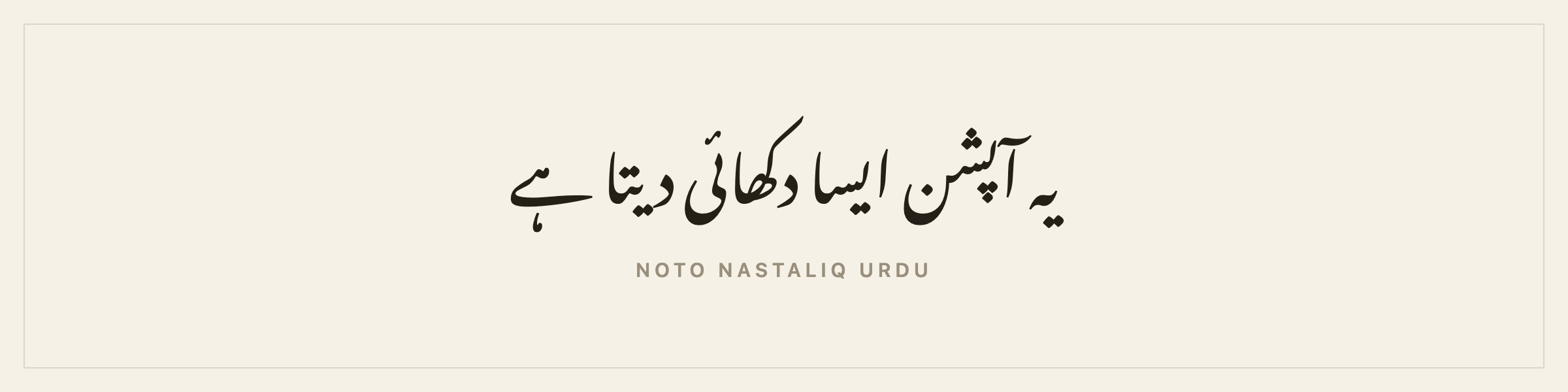
Gulzar is the better Nastaliq by most eyes, and it publishes no bold weight, so bold text in a Gulzar book gets a synthetic stroke instead of a drawn cut.
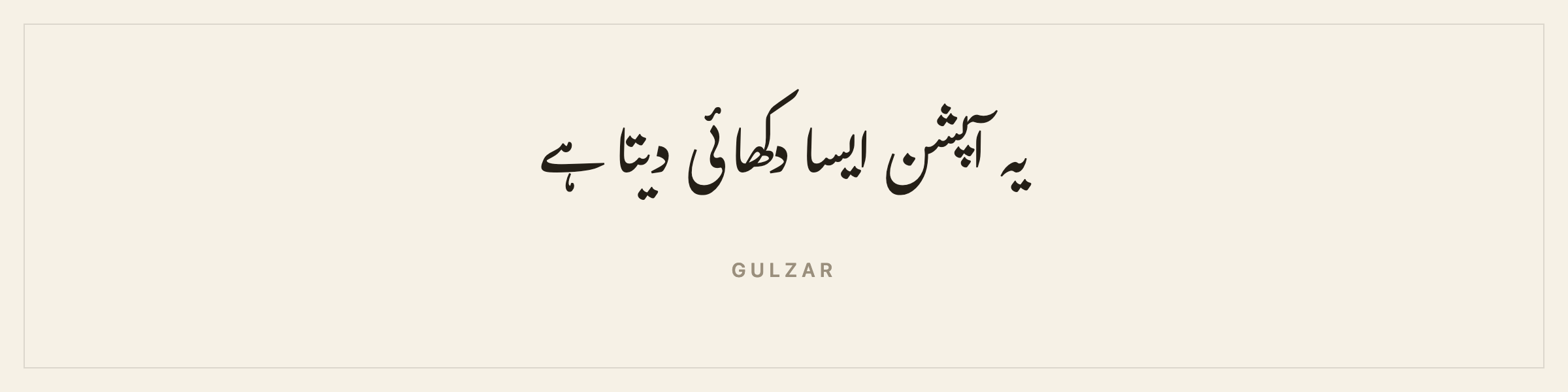
Both are offered because the trade between them is a real one and it is yours to make. The typeface documentation lists every face by language.
Exports for an Urdu novel
- Print-ready PDF at your trim, mirrored the correct way, Nastaliq shaped properly, font embedded.
- EPUB 3 with your cover, tagged
ur, with right-to-left page progression. - Store-ready EPUBs for Kobo and Apple Books.
- Word and Markdown for an editor or an archive.
- Manuscript format, double-spaced, running right to left.
- A proofreading PDF two pages to a sheet, and a large print PDF.
- A watermarked copy per beta reader.
The Amazon-shaped tools switch off on an Urdu book and say why.
Urdu punctuation
Urdu uses the Arabic comma ،, the question mark ؟ and its own full stop ۔, all ordinary characters that survive typing and both exports. The digits are Arabic-Indic on screen and in the print PDF, and fall back to Western digits in the Word export only, because the Office file format has no Arabic-Indic numbering value.
Chapter headings are still the English default on an Urdu book. Urdu ordinals are not a word swap and getting them right wants a native reader, so the app lets you title chapters yourself instead of shipping a guess. If you write in Urdu and want to tell me what the convention should be, say so.
How long an Urdu novel is
Urdu publishers quote length in pages and in printed sheets. Galley counts words, live, per chapter and per book, and projects a page count at your trim, which is the number a printer works from.
The word count to page count converter should be a helpful resource for you.
Trim sizes for an Urdu book
Six standards, from mass market at 4.25×6.87 inches to Royal at 6.14×9.21. Urdu publishing in South Asia commonly uses demy and crown octavo formats which land near the Digest at 5.5×8.5 inches and Royal. Ask your printer what they set before you choose, because Nastaliq’s leading pushes your page count up and your page count decides your spine.
The spine width calculator and the trim size comparison would be helpful here.
Metadata and the copyright page
Every field in the app detects its own direction, so an Urdu title and a Latin ISBN both come out right. The copyright page writes itself from what you filled in. An ISBN comes from the agency for your country of publication.
Translating into or out of Urdu
A translation in Galley is its own book: its own language, its own typeface shelf, its own ISBN, its own cover, still linked to the original, with the editor split so the original sits read-only beside what you write. An Urdu edition of a Hindi novel is the case people hit most often here, and the two are separate books with separate shelves that stay linked.
There are pages on writing a novel in Arabic, writing a novel in Persian, writing a novel in Hindi and writing a novel in Sindhi.
No machine touches the prose. Galley has no AI anywhere near your writing.
Self-publishing and traditional publishing in Urdu
Self-publishing. Amazon is closed to Urdu in every format, so print goes through a printer in Lahore, Karachi or Delhi, or through IngramSpark, and the ebook goes to Google Play, Apple Books or Kobo. Domestic print in Pakistan and India is cheap enough that a local run is often the better economics anyway.
Traditional publishing. Urdu publishing runs through established houses in Pakistan and India. The submission package assembles the synopsis, the bio and the opening chapters.
The same book exports both. The longer arguments are in Galley for self-publishing and Galley for traditional publishing.
Where to go next
- Writing software for novelists who don’t write in English covers every script Galley sets.
- Book design and typefaces lists every face by language.
- Series and translations covers the full language list.
- Book typography basics is the set of rules that makes a page look made.
Questions people ask about writing a novel in Urdu
Does Galley set Urdu in Nastaliq?
Yes. Set the book's language to Urdu and the shelf is Noto Nastaliq Urdu and Gulzar. The Arabic Naskh faces are not offered, because Naskh is not what an Urdu novel is set in.
Does the print PDF work for Urdu?
Yes. It did not until recently: the PDF exporter faked Arabic-script shaping through a legacy character block that Nastaliq faces do not carry, so every letter came out blank. It now shapes with the book's own script and direction, which is what Nastaliq needs.
Which Nastaliq face should I use?
Noto Nastaliq Urdu ships a bold weight and is the reliable choice. Gulzar is the better Nastaliq by most eyes and publishes no bold at all, so bold text in a Gulzar book gets a synthetic stroke. That trade is yours to make.
Can I sell an Urdu book on Amazon KDP?
No. Amazon does not list Urdu in any format. The print PDF goes to a printer in Lahore, Karachi or Delhi, or to IngramSpark, and the EPUB goes to any store that sells Urdu.
Other languages
- Book writing software for ArabicWrite and typeset an Arabic novel: right to left, set in Amiri or Noto Naskh, with a complete print pipeline. Including the Amazon rule that catches Arabic writers out.
- Book writing software for PersianWrite and typeset a Persian novel: right to left, set in Markazi Text or Amiri, with the half-space intact and a print-ready PDF at the end. What Persian asks of a book tool, and where most of them give up.
- Book writing software for HindiWrite and typeset a Hindi novel: Devanagari conjuncts shaped properly in the print PDF, two book faces cut for Hindi, matras that survive search, and an honest note on Amazon.