Book writing software for writing a novel in Japanese
Galley counts a Japanese book in characters, breaks lines by kinsoku shori, sets emphasis as bōten and not italics, puts a 奥付 at the back instead of a copyright page at the front, and offers the Japanese trim sizes. It sets horizontally. Vertical writing is not built.
日本語で小説を書く
Galleyは小説を書き、そのまま本にするためのソフトです。最初の一文から本物の本のページの上で書きます。判型も余白も、印刷される書体もそのままです。
書体は明朝体、行末の禁則処理は日本語の規則どおり、強調は傍点です。文字数で数え、奥付は巻末に置かれます。
最後に印刷所に渡せるPDFと、正しいEPUBができます。操作画面は英語ですが、本は日本語です。
Why Galley is the right book writing software for a novel in Japanese
Japanese is the language where nearly every default in an English-built tool is wrong, and the wrongness compounds.
Counting. Split text on spaces and a twelve-sentence Japanese paragraph counts as one word. Galley counts a Japanese book in characters and carries that unit through every screen that shows a number, including the reading time and the page-count projection.
Line breaking. Japanese does not write spaces between words, so a line breaker that only breaks on whitespace sets an entire paragraph as one line running off the page. That is not hypothetical; it happened here, and it was found by rendering a page and measuring where the text landed, not by reading the code. Galley now breaks by kinsoku shori, following JIS X 4051: the closing brackets, small kana, iteration marks and prolonged sound marks that may not begin a line, the opening brackets that may not end one, and the two marks that may hang in the margin.
Emphasis. Japanese emphasises with bōten, dots set above the characters, not with a slant. Japanese is the one script in the app where the italic shortcut does something other than nothing, and what it does is bōten.
Front matter. A Japanese book takes a 奥付 at the back and no copyright page at the front. Galley builds it from the same live fields a copyright page would use, and the picker does not offer a Japanese book the Western arrangement.
Trim. Six Japanese formats appear on a Japanese book that appear on no other: 新書判, the nearest KDP prints to a 文庫, 四六判, B6判, A5判 and 菊判.
One thing Galley does not do: vertical writing. It sets Japanese horizontally. 縦書き is not built, and if your novel has to be vertical then this is not the tool for the typesetting half of the job. That is said here so you do not find it later.
The typefaces you get for Japanese
Two Mincho faces, both under the SIL Open Font License, which is what lets Galley embed them in a file you sell.
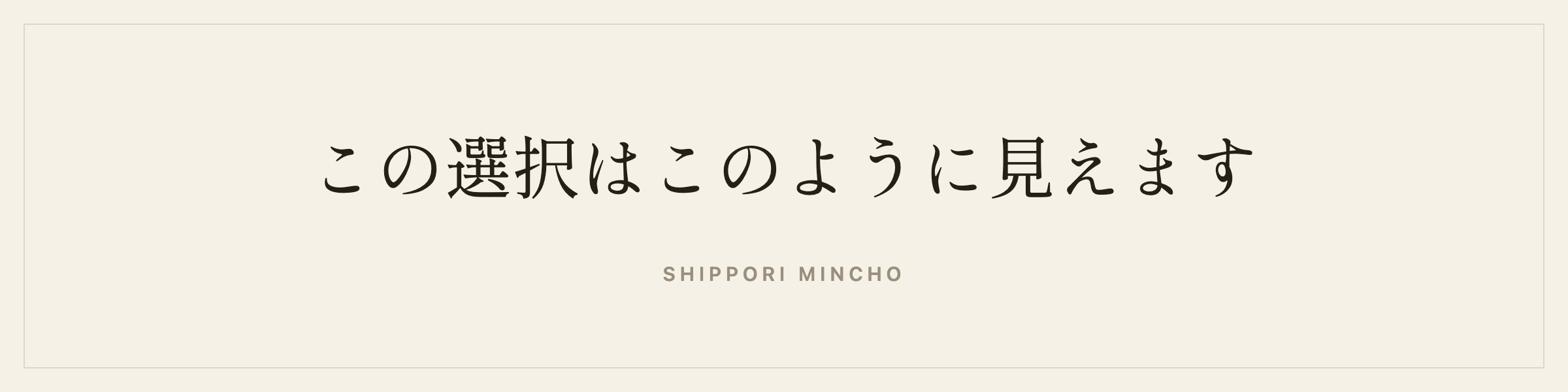
Shippori Mincho is the literary choice, drawn in the tradition Japanese novels are set in.
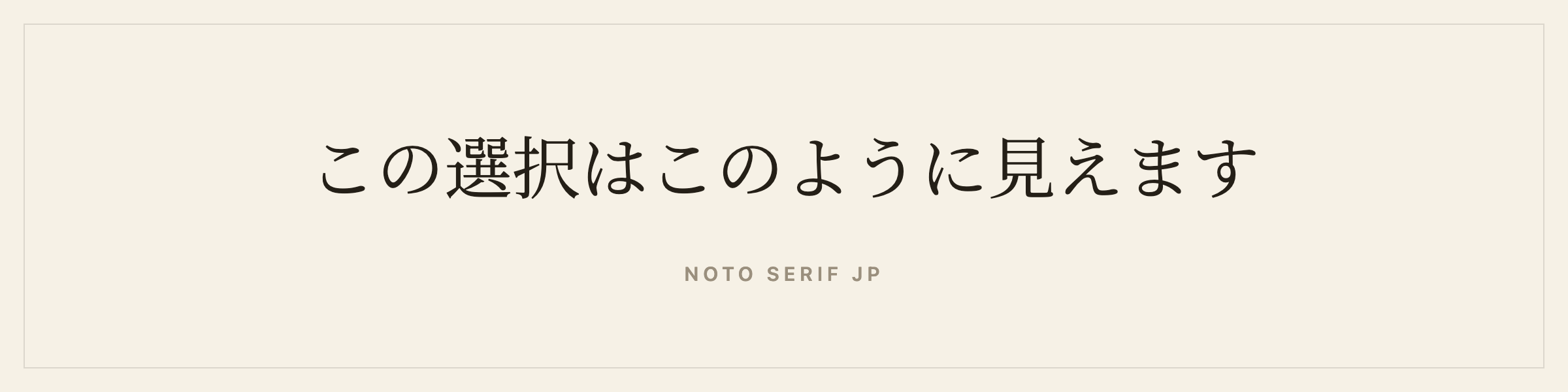
Noto Serif JP is the broad, reliable default.
Both are embedded in your print PDF and EPUB. In the editor itself, Japanese falls back to a system Mincho stack, because these faces run to tens of megabytes each and serving them to a browser on every page load would make the editor unusable. What you see while writing is a system face; what gets printed is the face you picked.
What you will not find here: Ryumin, Hiragino Mincho, Iwata Mincho. Morisawa and the other Japanese foundries license per title, and none of them permits embedding in a file you sell without a separate agreement. The typeface documentation lists every face by language.
Japanese punctuation and the mixed line
Quote substitution is off on a Japanese book. 「」 and 『』 are characters you type, and a smart-quote rule that turned a straight quote into a curly Latin one in Japanese text would be doing damage instead of work.
The Latin-Japanese gap is handled. 和欧混植 wants a quarter-em between a Japanese character and a Latin one, and Galley inserts it at typeset time. It folds into the preceding character’s width, so a line that breaks at that point does not carry a stray gap onto the next line, and an underline or a strike stops at the last character instead of running into the space.
Chapter headings are Japanese. 第一章 rather than “Chapter One”.
The language tag matters more here than anywhere else. Han characters are unified in Unicode, so a browser that does not know whether it is holding Japanese or Chinese may set your novel in Chinese letterforms. The EPUB is tagged, and so are the read-through and the beta-reader link.
Exports for a Japanese novel
- Print-ready PDF at your trim, mirrored margins, real gutter, font embedded, kinsoku shori applied.
- EPUB 3 with your cover, tagged
ja. - Store-ready EPUBs for Kindle, Kobo and Apple Books.
- Word and Markdown for a 編集者 or an archive.
- Manuscript format, double-spaced, set in the book’s own face and counting in the book’s own unit.
- A proofreading PDF two pages to a sheet, and a large print PDF.
- A watermarked copy per beta reader.
The KDP preflight checks the file against Amazon’s rules, with a page estimate that divides by characters per page instead of words per page. Using the English divisor reported a Japanese book as two and a half times longer than it is and failed novellas against Amazon’s page cap.
How long a Japanese novel is
In characters. Japanese publishing counts 原稿用紙 of 400 characters, and a manuscript is quoted in sheets. Galley counts characters live, per chapter and per book, which converts directly: 100,000 characters is 250 sheets.
The word count to page count converter works in words, so use the app’s own page-count projection for a Japanese book, which is built on the character count at your trim.
Trim sizes for a Japanese book
Set a book’s language to Japanese and the trim list gains the sizes Japanese books are actually issued at: 新書判 at 103×182mm, the 105×173mm that is the nearest KDP prints to a 文庫, 四六判 at 127×188mm, B6判 at 128×182mm, A5判 at 148×210mm and 菊判 at 152×218mm. A book in any other language is offered the six standards and not these.
The spine width calculator does the cover maths for you.
Metadata and the 奥付
The 奥付 builds itself from the metadata you already filled in, and it goes at the back where it belongs. A Japanese ISBN comes from the Japan ISBN agency.
Every field in the app detects its own script, so a Japanese title and a Latin ISBN both come out right, and the download filename keeps its Japanese: a book called 静かな時間のランタン arrives under its own name instead of a row of underscores.
Translating into or out of Japanese
A translation in Galley is its own book: its own language, its own typeface shelf, its own ISBN, its own cover, still linked to the original, with the editor split so the original sits read-only beside what you write. A Japanese edition of an English novel gets Shippori Mincho, character counting, kinsoku shori and a 奥付, none of which is right for the English original.
There are pages on writing a novel in Chinese, writing a novel in Korean and writing a novel in Thai.
No machine touches the prose. Galley has no AI anywhere near your writing, which includes not offering to translate it.
Self-publishing and traditional publishing in Japanese
Self-publishing. Amazon takes Japanese as a Kindle ebook and a paperback, and never as a hardcover. Japanese is the only CJK language KDP prints at all. The same print PDF also goes to a Japanese printer or to IngramSpark.
Traditional publishing. Japanese publishing runs on new-writer prizes as much as on submissions, and a 新人賞 usually wants a manuscript in 原稿用紙 counts. The submission package assembles the synopsis, the bio and the opening chapters, and the manuscript export counts in the book’s own unit.
The same book exports both. The longer arguments are in Galley for self-publishing and Galley for traditional publishing.
Where to go next
- Writing software for novelists who don’t write in English covers every script Galley sets.
- Book design and typefaces lists every face by language.
- Series and translations covers the full language list.
- Choosing a trim size is the longer argument on format.
Questions people ask about writing a novel in Japanese
Does Galley support vertical writing?
No. Galley sets Japanese horizontally. Vertical writing is not built, and if your novel has to be 縦書き then this is not the tool for the typesetting half of it.
How does Galley count a Japanese book?
In characters, not words, and the unit label follows through every screen that shows a number, including the reading-time estimate and the page-count projection. Splitting Japanese on spaces would count a whole paragraph as one word.
How does Japanese mark emphasis?
Bōten, the dots set above the characters. Japanese is the one script in the app with a real emphasis convention that is not italics, so it is the one script where the italic shortcut does something else.
Can I sell a Japanese book on Amazon KDP?
As a Kindle ebook and a paperback. Amazon does not print Japanese in hardcover. It is the only CJK language KDP prints at all.
Does a Japanese book get a copyright page?
No. It gets a 奥付 at the back instead, seeded from the same metadata a copyright page would use, because that is the Japanese convention.
Other languages
- Book writing software for ChineseWrite and typeset a Chinese novel in Simplified or Traditional: Song faces, kinsoku line breaking, character counting, and a print-ready PDF. Including what Amazon will and will not take.
- Book writing software for KoreanWrite and typeset a Korean novel: Myeongjo faces embedded in the print PDF, Korean chapter headings, word counting that works because Korean spaces its words, and a print-ready file.
- Book writing software for ThaiWrite and typeset a Thai novel: character counting because Thai has no word spaces, stacked vowels and tone marks that do not collide, two book faces and a print-ready PDF.