The Copyright Page for a Novel, Line by Line
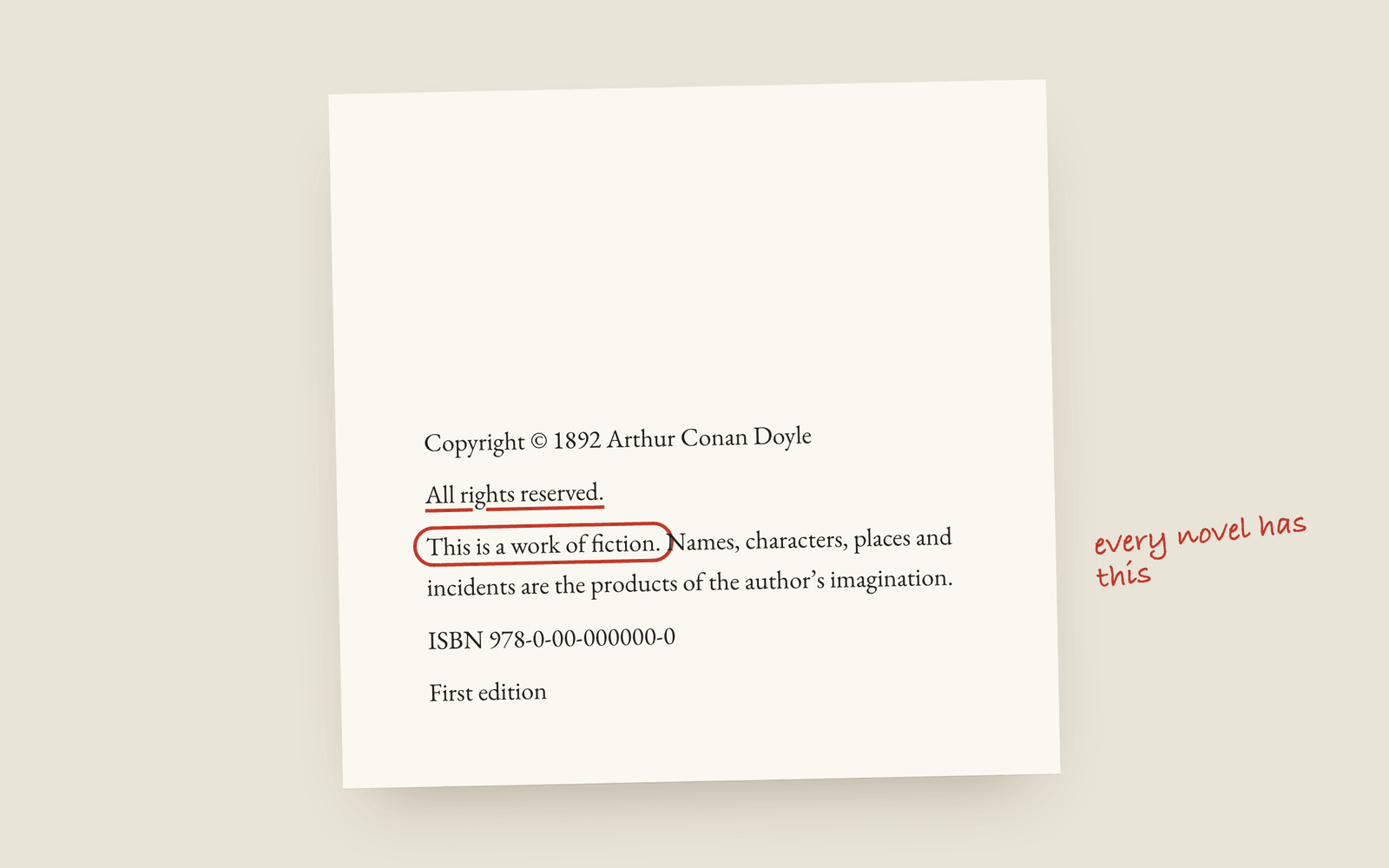
A novel's copyright page usually carries the copyright notice, a rights reservation, the fiction disclaimer, the ISBN, the edition line and, if you have one, the publisher or imprint. None of it is what makes your copyright exist (you own it the moment you write the book), but stores, libraries and anyone wanting to quote you look for it there.
The copyright page is the one page in your book nobody reads and everybody copies from somewhere. Most self-published authors take the wording from whatever paperback is nearest. That mostly works, but it’s how you end up with a Library of Congress block you don’t have, or a line saying “Printed in the United States” on a book printed by KDP in Poland.
Here’s what each line does, so you can decide which ones you need.
First, what it doesn’t do
You don’t need a copyright page to own the copyright. Under the Berne Convention (which almost every country has signed) a work is protected as soon as it’s written down. The notice is a statement, not a registration. In the US you can also register with the Copyright Office, which matters if you ever need to sue, but that’s separate from the page.
KDP doesn’t require a copyright page either. It’s just that every book has one, and a book without one looks unfinished.
The lines, in the usual order
The copyright notice. Copyright © 2026 Your Name. The symbol, the year of first publication, and the owner. Use your pen name if you publish under one (or your legal name, it’s your choice and both are common).
The rights reservation. All rights reserved. Followed, in most books, by a longer clause: No part of this book may be reproduced in any form or by any electronic or mechanical means without written permission from the author, except for the use of brief quotations in a book review. That last bit matters, because it tells reviewers they can quote you.
The fiction disclaimer. This is a work of fiction. Names, characters, places and incidents are either the products of the author's imagination or are used fictitiously. Any resemblance to actual persons, living or dead, is entirely coincidental. Every novel carries some version of this. It’s not a magic shield, but it’s expected.
The ISBN. If the paperback and ebook have different ISBNs, list both with their format: ISBN 978-1-234567-89-0 (paperback). If you’re using KDP’s free ISBN, that goes here too. More on whether you need your own in do you need an ISBN.
The edition line. First edition 2026, or First published in 2026. Traditional books often use a printing line instead, a row of numbers like 10 9 8 7 6 5 4 3 2 1 where the lowest number is the printing. With print-on-demand that’s pointless, because there are no print runs.
The publisher or imprint. If you’ve set up an imprint name, put it here with an address or website. If you haven’t, leave it out. Don’t put “Independently published”, KDP adds that to its own listings.
Lines that are optional
- Credits. Cover design, editing, interior illustration. It’s a nice thing to do and people in the industry read it.
- Permissions. If you quote a song lyric or a poem, the rights holder will usually tell you the exact credit line to print. Often it goes here. There’s more on that in how to credit quoted material.
- CIP data. Cataloguing-in-publication is a block of library data that traditional US publishers get from the Library of Congress. Self-published books usually can’t get it, so don’t copy the block from another book.
- A Creative Commons licence, instead of “All rights reserved”, if you want people to be able to share the book.
- “Printed in…” Skip it for print-on-demand. You don’t know where each copy is printed.
Where it goes and how it looks
The copyright page is the back of the title page (the left-hand page straight after it), in small type, usually ranged left and sitting at the foot of the page. The front matter order post has where it sits among the other pages.
How Galley does it
Add a copyright page to your front matter and Galley writes it from your book’s details: the notice, the rights line, the fiction disclaimer, your ISBNs and the edition line. It’s built from blocks you can add, remove and reorder, including a Creative Commons licence (which replaces the rights reservation, since you can’t have both) and your publisher. The title, author, year and ISBN are live fields, so renaming the book updates the notice. It’s set in small type at the foot of the page. The docs have the details.
If your book isn’t in Galley, the free copyright page generator builds the same text in the browser for you to paste.
More on publishing
- Kindle Unlimited Page Reads: How KENP PaysHow Kindle Unlimited pays authors through KENP page reads, roughly what a page is worth, how many KENP pages your novel is, and when a borrow beats a sale.
- KDP Royalties Explained: 35%, 70% and the Paperback MathsHow Amazon KDP pays for ebooks and paperbacks: the 35% and 70% ebook bands, the delivery fee, the paperback royalty and printing cost, and worked examples for a typical novel.
- How to Credit Quoted Material in a BookHow to credit an epigraph, a quoted poem or lyric, and a passage from another book in your novel, where the credit goes, and why you should use the rights holder's exact wording.