Running Heads and Folios: The Top and Bottom of a Book Page
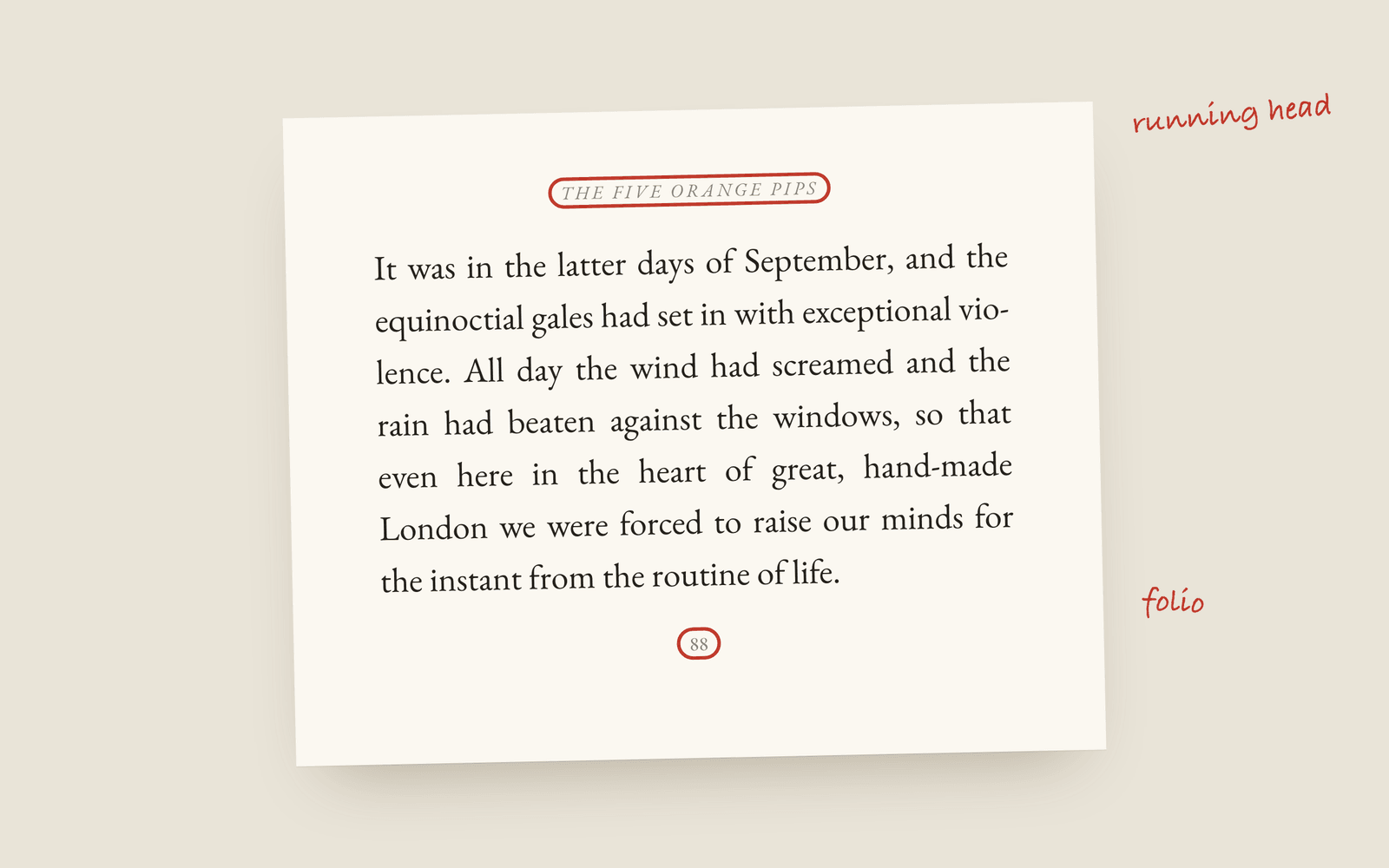
A running head is the line of small type at the top of a printed page, usually the author's name on the left page and the book title (or chapter title) on the right. A folio is the page number. Both are left off chapter opening pages, blank pages and part pages. Most novels keep both small, italic or small caps, and out of the way.
Open any paperback and look above the text. There’s a line of small type up there that you’ve read past thousands of times without noticing: the author’s name on the left-hand page, the book’s title on the right. That’s the running head. The page number is called the folio, and in most novels it sits at the foot of the page, centred.
They’re there for the same reason. Somebody flipping through the book should be able to tell where they are without reading a paragraph.
What goes where
The left page is the verso and the right page is the recto (the anatomy of a book page has a labelled diagram if those words are new). The common patterns for a novel are:
| Left page (verso) | Right page (recto) | Who does it |
|---|---|---|
| Author name | Book title | Most fiction. The default for a novel. |
| Book title | Chapter title | Books where chapter titles mean something, like a story collection. |
| Nothing | Nothing | Some literary presses, and books that want the page to stay bare. |
The Adventures of Sherlock Holmes is a good case for the second one, because it’s twelve separate stories and a reader looking for “The Speckled Band” wants to see it at the top of the page.
Running heads are set small, about two points under the body text, and usually in italic or small caps. They shouldn’t compete with the prose. A running head in bold is a tell that the book was laid out in a word processor.
The pages that don’t get them
This is the part that self-made interiors get wrong most often. A running head and a folio are left off:
- Chapter opening pages. The chapter title is already there. Some books keep the folio and move it to the foot (a drop folio), some drop it entirely.
- Blank pages. The left page before a chapter that has to start on the right stays completely empty.
- Part title pages. “Part Two” on its own page doesn’t need a header.
- Most front matter. The title page, copyright page and dedication carry no running head, and traditional books number the front matter in roman numerals (or not at all).
A blank page with a page number on it looks like a printer’s mistake, and readers do notice that one.
Page numbers
Folios go at the foot of the page, centred, or at the top on the outside edge next to the running head. Either is fine. The rule is that the first page of chapter one is page 1 in most commercial fiction, or the number carries on from the front matter if you’re numbering everything.
If the book is going to KDP or IngramSpark, the page count on the PDF is what your spine width is worked out from, so blank pages count even though nobody numbers them.
How Galley does it
Running heads are a book design setting with three options: Author & title, Title & chapter, or None. They’re set in italic, a size down from the body text, on the outside edge of each page, which moves with the gutter as the pages alternate. The folio sits at the foot of the page, centred.
Chapter opening pages get a folio and no running head, and the standalone pages (the dedication, the copyright page, part pages) get neither. You don’t set any of that, it’s how the print PDF is made. The ebook has no running heads at all, because an e-reader has no fixed pages. The full list of settings is in the book design docs, and the glossary has the definitions.
More on formatting
- What Is a Dinkus? Scene Breaks in a Printed NovelWhat a dinkus is, the other marks novels use for a scene break, and why a blank line on its own goes wrong at the bottom of a printed page.
- Book Margins and the Gutter: The Numbers for KDPKDP's minimum margins by page count, why the inside margin (the gutter) has to grow as a book gets thicker, and what margins a novel should actually use.
- How to Choose a Trim Size for Your NovelWhat trim size means, the standard sizes for fiction (5×8, 5.5×8.5, 6×9 and the UK B-format), and how to pick the one that suits your genre and page count.